
In this guide, you will learn:
- Which plans are available for hosting services:
- How to change the plan
- How to change the billing period
- Frequently Asked Questions
Plan comparison
The following overview compares the plans of the Webhosting, Hosting WP and Mailhosting services. If you need to find out which of these services is suitable for your project, also see the guide Services – Guide to choosing.
Webhosting
The Webhosting service offers three plans for projects of different sizes.
| Parameter | LowCost | NoLimit | Extra |
|---|---|---|---|
| Web space | 10 GB | Unlimited | Unlimited |
| Database space | 1 GB | 2 GB | 5 GB |
| Email space | 5 GB | 5 GB | 10 GB |
| Aliases | – | 3 | 3 |
| Backup | Weekly | Weekly | Daily |
Hosting WP
The Hosting WP service offers three plans covering a wide range of requirements.
All plans have several common features:
- The service includes one WordPress content management system on one domain or subdomain. It does not support aliases or additional subdomains.
- The web servers use Litespeed and Redis cache for maximum application performance.
- Protection against DDoS, brute force and other attacks is provided by WEDOS Global Protection.
The basic differences between the individual plans are shown in the table:
| Parameter | LowCost WP | NoLimit WP | Business WP |
|---|---|---|---|
| Web space | 10 GB | Unlimited | Unlimited |
| Database space | 1 GB | 2 GB | 5 GB |
| Email space | – | 10 GB | 1 TB |
| Billing period | Annual only | Annual only | Annual or monthly |
Mailhosting
The Mailhosting service offers two plans, which can be further configured with add-on services. The basic differences between the individual plans are shown in the table:
| Parameter | Individual | Business |
|---|---|---|
| Number of email mailboxes | Unlimited | Unlimited |
| Default email space | 5 GB | 1 TB |
| Maximum email space | 505 GB | 5 TB |
| Billing period | Annual only | Annual or monthly |
Plan change
For Hosting WP, you can increase or decrease the plan. When changing the plan, keep the following rules in mind:
- When increasing the plan, the system will issue a balance invoice in an amount corresponding to the price of the service for the entire remaining period. If add-on services are cancelled during the upgrade, the system will reduce the price accordingly.
- When decreasing the plan, we do not refund any money paid for the upgrade, not even partially. The system will allow the downgrade only if the status of the email services meets the parameters of the target plan.
Preparation for a plan change
No preparation is needed to increase the plan.
Before decreasing the plan, make sure that your email mailboxes do not contain a larger volume of emails than the new plan allows. If the target service plan does not support emails, delete the mailboxes completely.
Performing a plan change
Submit the change of the hosting service plan as follows:
- Log in to the customer administration ⧉.
- In the navigation bar, select Hosting services Webhosting, Hosting WP, or Mailhosting.
- Select the service whose plan you want to change from the list.
- In the left menu, select Change plan or Change variant.
- For the selected plan, choose the billing period and click the SELECT button.
- Confirm the change with the SET PLAN or SET VARIANT button.
Change service plan:
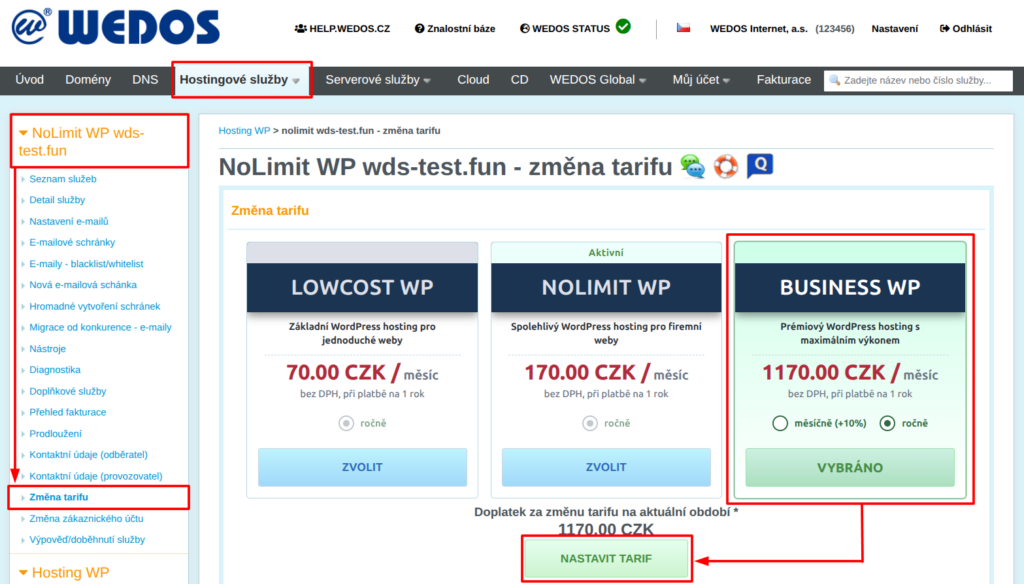
If the balance for the change is non-zero, the system will immediately issue and send a balance invoice.
Change of billing period
To change the billing period, proceed as with changing the plan, but in the box with the selected plan, check the chosen billing period.
Change service billing period:
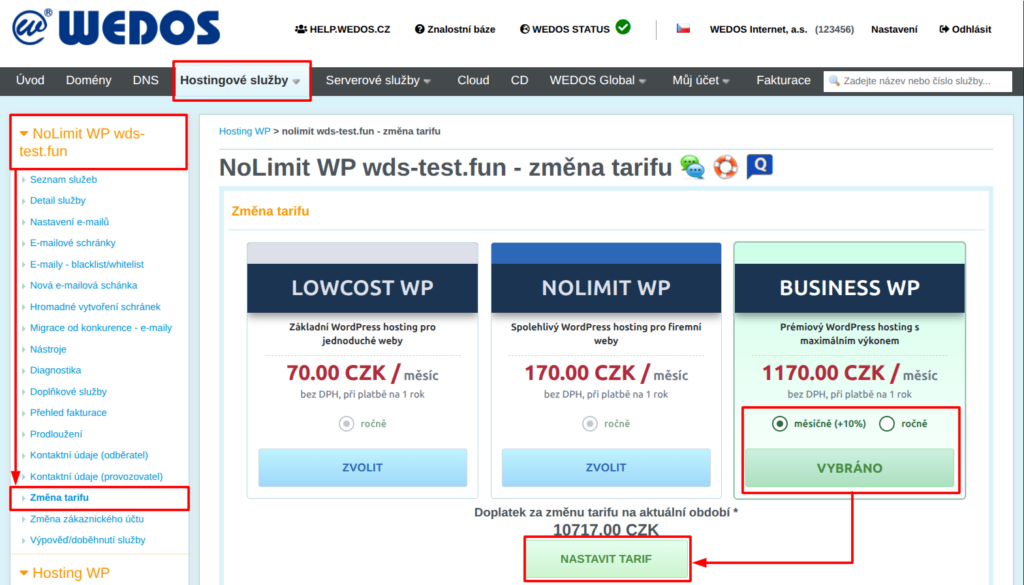
The change of billing period will take effect only after the current service expiration date.
Frequently Asked Questions
I am increasing the Hosting WP or Mailhosting plan to Business with monthly billing. Why is the value of the balance invoice so high?
The balance invoice charges the service according to the current billing period. With a monthly period, the system will issue invoices only starting from the next period.