
For the add-on service to function properly, set the domain's DNS servers (NSSET) to WEDOS.
This guide covers activating WEDOS Protection as a domain add-on service. Alternatively, you can add the domain directly in the WEDOS Global interface according to the guide Protection – Adding a domain ⧉, or through the WordPress plugin ⧉.
General instructions for activating and deactivating add-on services can be found in the article Services – Add-on services.
In this article, you will learn:
Activating WEDOS Protection on a domain
Before activating the WEDOS Global add-on service, make sure the domain uses our DNS servers. Instructions can be found in the article Domains – DNS servers (NSSET).
You can activate WEDOS Global as a domain add-on service either during the order process or later in the customer administration. Detailed instructions for activating add-on services can be found in the article Services – Add-on services.
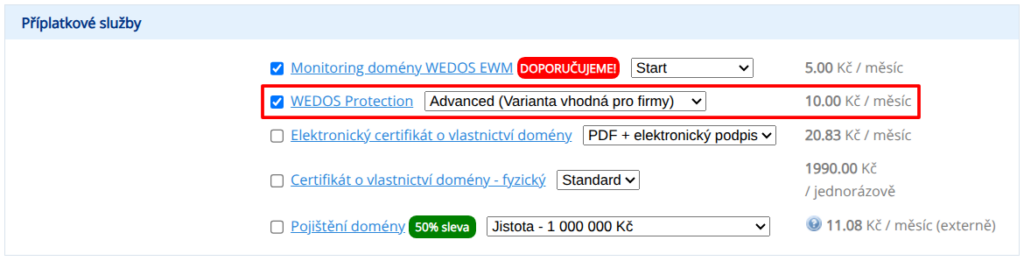
When activating it this way, the system automatically performs the following settings:
- changes A and AAAA DNS records (for the main domain and subdomains covered by the * record);
- basic Global system settings for the selected variant.
The settings are typically applied within 30 minutes of activating the add-on service or detecting the DNS server change to ours.
After the domain setup is completed, or immediately after activating the add-on service in the customer administration, the system adds the selected domain to the WEDOS Global administration ⧉.
In the domain details, make sure the DNS settings are OK. If they are not, direct the domain to WEDOS Protection in the customer administration, or set the correct DNS records manually.

Common issues
Common issues with activating the WEDOS Protection add-on service include:
Error in automatic domain directing to Protection
Problem: After activating the add-on service, the domain's DNS records still point to the hosting instead of WEDOS Global.
Solution: If you have the domain registered with us, direct it to WEDOS Protection according to this guide. More detailed information and instructions for manual DNS setup for WEDOS Global can be found in the article Protection – DNS and target IP addresses ⧉.
Frequently asked questions
Can I activate a trial version of the service this way?
Not in full. Add-on services can only be canceled and refunded within 7 days of the order. If you want to use the trial version in full, activate it according to the guide Protection – Subscription ⧉.